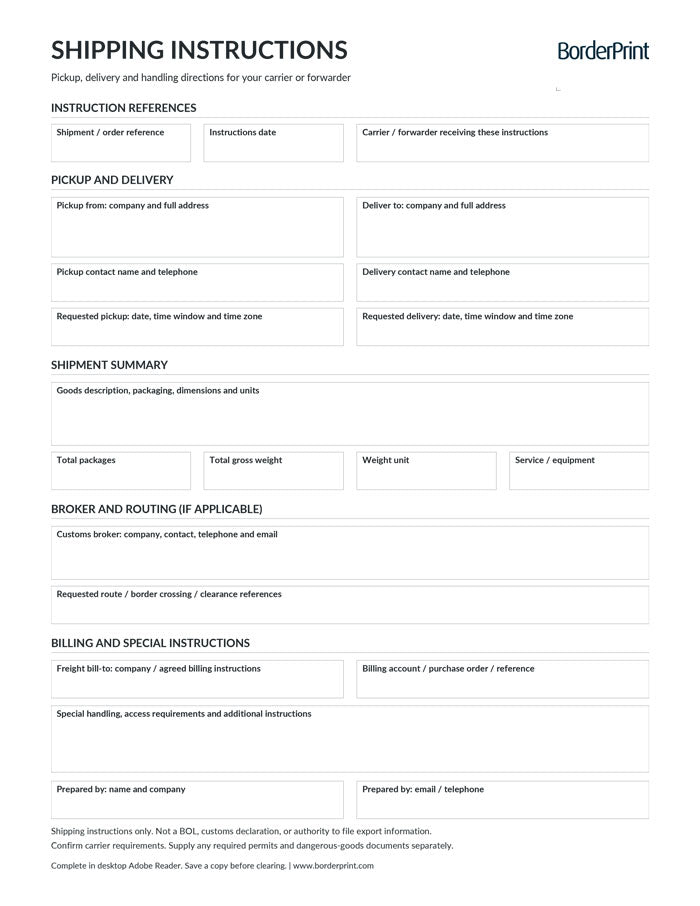


Keep pickup, delivery, and handling directions organized with BorderPrint’s free, digitally fillable Shipping Instructions Form. This reusable one-page PDF brings shipment details, contacts, broker information, routing preferences, and billing instructions together for your carrier or freight forwarder.
Features
- Digitally fillable fields: Enter shipment references, instruction dates, and the carrier or forwarder receiving your instructions.
- Pickup and delivery details: Record company names, full addresses, contacts, telephone numbers, requested dates, time windows, and time zones.
- Shipment summary: Describe the goods, packaging, and dimensions, then enter the total package count and gross weight.
- Weight-unit selection: Choose kilograms or pounds using the kg/lb dropdown.
- Broker and routing information: Include customs-broker contacts, requested routes, border crossings, and clearance references where applicable.
- Billing and handling instructions: Identify the agreed freight payer, billing references, service or equipment needs, and special-handling requirements.
- Clear Form button: Resets all entries after confirmation. The button does not appear on printed copies.
- Clean printing: Transparent entry fields have no permanent blue or grey backgrounds.
- Reusable master: Keep a blank copy and save a separate completed PDF for each shipment.
Important: Shipping Instructions Only
This form communicates operational instructions to your carrier or forwarder. It is not a bill of lading, customs declaration, or authorization to file export information on your behalf.
Confirm whether your carrier or forwarder requires its own instructions form or booking process. Supply any required customs documents, permits, export authorizations, or dangerous-goods documents separately.
Download Before Completing
Download the PDF and open it in desktop Adobe Acrobat Reader. Use this recommended workflow to complete, review, and save your instructions. Keep an unused master copy for future shipments.
How to Complete Your Shipping Instructions
- Save and open: Download the PDF to your computer and open it in desktop Adobe Acrobat Reader.
- Identify the shipment: Enter your shipment or order reference, the instructions date, and the carrier or forwarder receiving the document.
- Enter pickup and delivery locations: Complete both company names and full addresses, including applicable postal or ZIP codes and countries.
- Add contacts and appointment details: Enter pickup and delivery contact names, telephone numbers, requested dates, time windows, and time zones.
- Describe the shipment: Enter the goods description, packaging details, and dimensions. Include measurement units, such as centimetres or inches.
- Enter packages and weight: Manually enter the total package count and gross shipment weight, including packaging. Select kg or lb to match the weight entered.
- Specify service requirements: Note the requested service or equipment, such as LTL, dedicated truck, liftgate, or temperature-controlled service.
- Add broker and routing details: Where applicable, enter the customs broker’s contact information, requested route or crossing, and clearance references.
- Complete billing instructions: Identify the agreed freight payer and relevant account, purchase order, or billing reference.
- Add special instructions: Describe access restrictions, loading or unloading needs, handling precautions, or temperature requirements with units.
- Review and save: Complete the prepared-by contact details and use Save As with a new filename. Send the completed copy through your carrier’s or forwarder’s accepted channel.
Before Sharing Your Instructions
- Confirm arrangements: Requested pickup times, delivery appointments, equipment, and routes should be confirmed with the carrier or forwarder.
- Enter totals manually: Package count and gross weight are not calculated automatically.
- Check the weight unit: Selecting kg or lb labels the entered weight; it does not convert the number.
- Clarify billing: The freight bill-to field identifies the agreed freight payer. It does not assign responsibility for customs duties or taxes.
- Protect payment information: Use account or billing references only. Do not include payment-card details.
- Submit separately: Completing or saving the PDF does not book transportation or send instructions automatically.
- Save before clearing: Clear Form removes all entered information after confirmation.
How You Receive It
- Instant download: Access your file on the order confirmation page after checkout.
- Email backup: A download link is also sent to your inbox, with up to three downloads per purchase.
Save your downloaded master for future shipments. This is a digital PDF product; no physical forms are shipped, and custom company branding is not included.