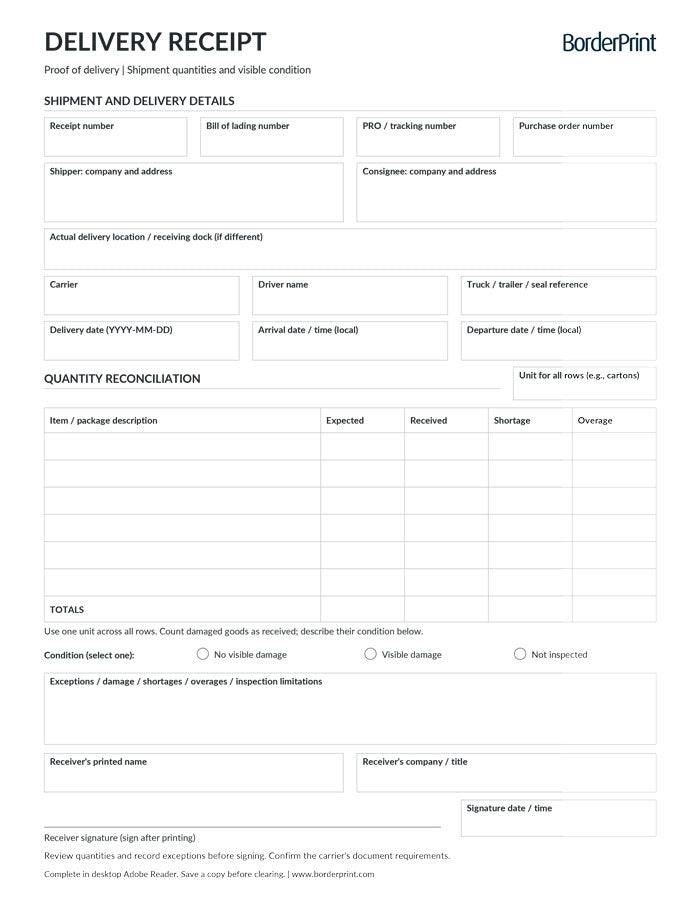


Document shipment receipt with BorderPrint’s free, digitally fillable Delivery Receipt / Proof of Delivery. This reusable one-page PDF helps you record delivery details, compare expected and received quantities, note visible damage or other exceptions, and obtain the receiver’s signature.
Features
- Digitally fillable fields: Enter shipment references, shipper, consignee, carrier, driver, and delivery-location details.
- Delivery timing: Record the delivery date, arrival and departure dates and times, and signature date and time.
- Six item rows: Describe the goods or packages and enter expected and received quantities.
- Automatic quantity calculations: Calculates shortages and overages for each completed row, along with expected, received, shortage, and overage totals.
- Separate shortage and overage totals: Extra quantities on one row do not cancel out missing quantities on another.
- Condition and exception notes: Select the visible-condition assessment and document damage, shortages, overages, or inspection limitations.
- Receiver confirmation: Includes fillable receiver details and a handwritten signature line.
- Clear Form button: Resets entries after confirmation. The button does not appear on printed copies.
- Clean printing: Transparent entry fields have no permanent blue or grey backgrounds.
- Reusable master: Keep a blank copy and save a separate completed PDF for each delivery.
Download Before Completing
Download the PDF and open it in desktop Adobe Acrobat Reader. Use this recommended workflow to complete the form, review the calculations, and save your delivery record. Keep an unused master copy for future use.
How to Complete Your Delivery Receipt
- Save and open: Download the PDF to your computer and open it in desktop Adobe Acrobat Reader.
- Enter shipment references: Complete the applicable receipt number, BOL number, PRO or tracking number, and purchase order number.
- Identify the parties and location: Enter the shipper and consignee details, actual delivery location where different, carrier, driver, and vehicle references.
- Record delivery timing: Enter the delivery date and the arrival and departure dates and local times.
- Choose one count unit: Enter the unit used throughout the table, such as cartons, pallets, or pieces. Use that same unit for every row.
- Enter quantities: Describe each item or package group, then enter its expected and physically received quantities. Enter 0 when none were received; do not leave the received field blank.
- Review the calculations: Move out of each completed field, then check the shortage, overage, and total quantities. Complete both quantity fields on every used row.
- Record condition and exceptions: Select No visible damage, Visible damage, or Not inspected. Describe any damage, shortages, extra goods, or inspection limitations in the notes.
- Complete receiver details: Enter the receiver’s printed name, company or title, and signature date and time.
- Save, print, and sign: Save a separate completed copy, print the receipt, and obtain the receiver’s signature after reviewing the recorded quantities and exceptions.
Important Quantity Notes
- Count damaged goods as received: Include goods physically received in the received quantity, then describe their damage separately.
- Blank is not zero: A row’s shortage and overage remain blank until both expected and received quantities are entered.
- Complete every used row: Overall shortage and overage totals remain blank while any started quantity pair is incomplete.
- Do not mix units: Avoid adding pallets, cartons, and individual pieces together in the same totals.
- Keep discrepancies separate: The form totals shortages and overages independently rather than offsetting one against the other.
Before Signing or Sharing
Review all quantities and record exceptions before signing. Confirm whether your carrier or customer requires its own delivery receipt, BOL, or electronic proof-of-delivery process.
This template records delivery details; it does not submit a freight claim or send information to a carrier automatically. Save your completed record before using Clear Form.
How You Receive It
- Instant download: Access your file on the order confirmation page after checkout.
- Email backup: A download link is also sent to your inbox, with up to three downloads per purchase.
Save your downloaded master for future deliveries. This is a digital PDF product; no physical forms are shipped, and custom company branding is not included.