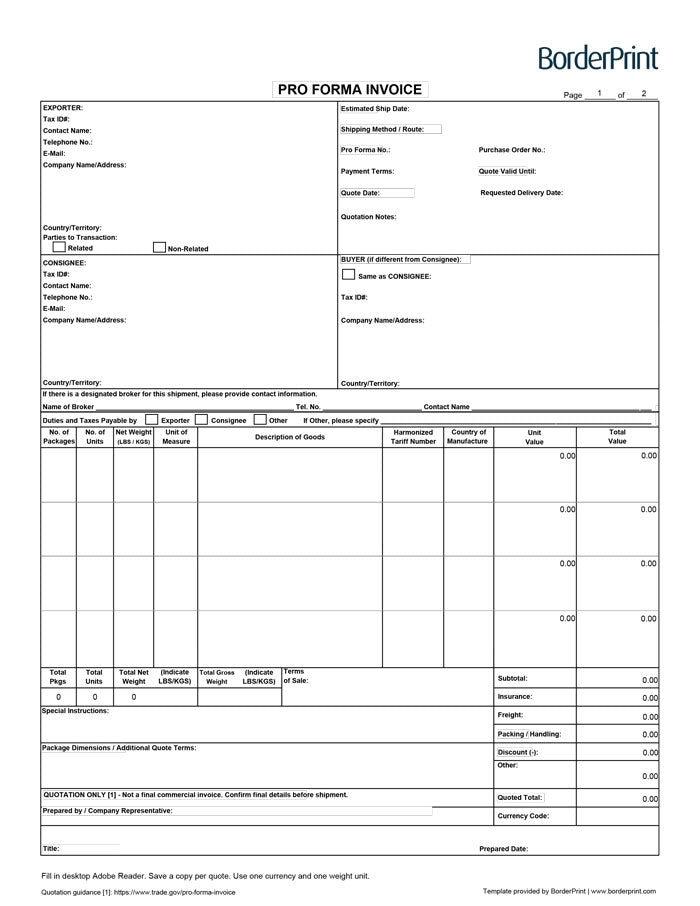


Prepare clear, professional quotations with BorderPrint’s free, fillable Pro Forma Invoice. This reusable two-page PDF includes 14 line items, automatic calculations, and dedicated quotation fields to help you outline proposed pricing and shipment details.
Features
- Digitally fillable fields: Enter seller, buyer, consignee, goods, and proposed shipment information directly into the PDF.
- Quotation details: Include your pro forma number, quote date, validity date, estimated shipping date, requested delivery date, and payment terms.
- Automatic line-item values: Calculates quantities multiplied by unit prices.
- Automatic totals: Adds package counts, quantities, net weights, and goods values across both pages.
- Charges and discounts: Calculates the quoted total with insurance, freight, packing and handling, other charges, and a fixed-amount discount.
- Continuation sheet: Provides space for 14 line items in total, with shared company and quotation details linked between pages.
- Clear Form button: Resets entries on both pages after confirmation. The button does not appear on printed copies.
- Reusable master: Save a blank copy and create a separate completed PDF for each quotation.
Important: A Quotation, Not a Final Commercial Invoice
A pro forma invoice presents proposed goods, prices, and transaction terms before the final commercial invoice is issued. It should not be treated as a universal substitute for the final commercial invoice used for customs clearance. Learn more in the International Trade Administration’s pro forma invoice guidance.
Download Before Completing
Download the PDF and open it in desktop Adobe Acrobat Reader. Use this workflow to complete, review, and save your quotation. Keep an unused master copy for future use.
How to Complete Your Pro Forma Invoice
- Download and save: Save the PDF to your computer, then open it in desktop Adobe Acrobat Reader.
- Enter company details: Complete the applicable seller, consignee, buyer, and contact fields.
- Set your quotation details: Enter a pro forma number, quote date, validity date, estimated shipping date, and requested delivery date where applicable.
- Specify the terms: Enter the shipping method, payment terms, and agreed terms of sale. If using an Incoterm, include the named place in the space below it.
- Add your goods: Enter descriptions, package counts, quantities, units of measure, unit prices, and any applicable tariff and country-of-manufacture information. Use page two for additional items.
- Enter weights: Use the total net weight for each row, not the weight of a single unit. Use one weight unit consistently and enter the estimated total gross weight, including packaging, separately.
- Add charges and discounts: Enter applicable additional charges. Enter any discount as a positive monetary amount, not a percentage; the form subtracts it from the quoted total.
- Complete notes and dimensions: Add package dimensions with their units, special instructions, and any additional quotation terms.
- Review the calculations: Move out of each completed field, then check line values and totals. Page-two goods values are already included in the page-one total.
- Save your quotation: Complete the prepared-by details and use Save As with a new filename. Share or print the completed copy while keeping your master blank.
Before Sharing Your Quote
- Use one currency: Enter its currency code and use it for all prices, charges, and discounts.
- Avoid duplicate package counts: Count each package once, even if it contains goods listed on several rows.
- Check quantity units: The total-units field adds all quantities. Only treat that figure as a meaningful combined quantity when the units of measure are compatible.
- Review the discount: Confirm the amount is correct and does not exceed the quoted charges.
- Save before clearing: Clear Form removes entries from both pages, including quotation details and goods information.
How You Receive It
Free instant download: select Download fillable PDF at the top of this page. No checkout, account or email is required.
Save your downloaded master for future quotations. This is a digital PDF product; no physical forms are shipped, and custom company branding is not included.