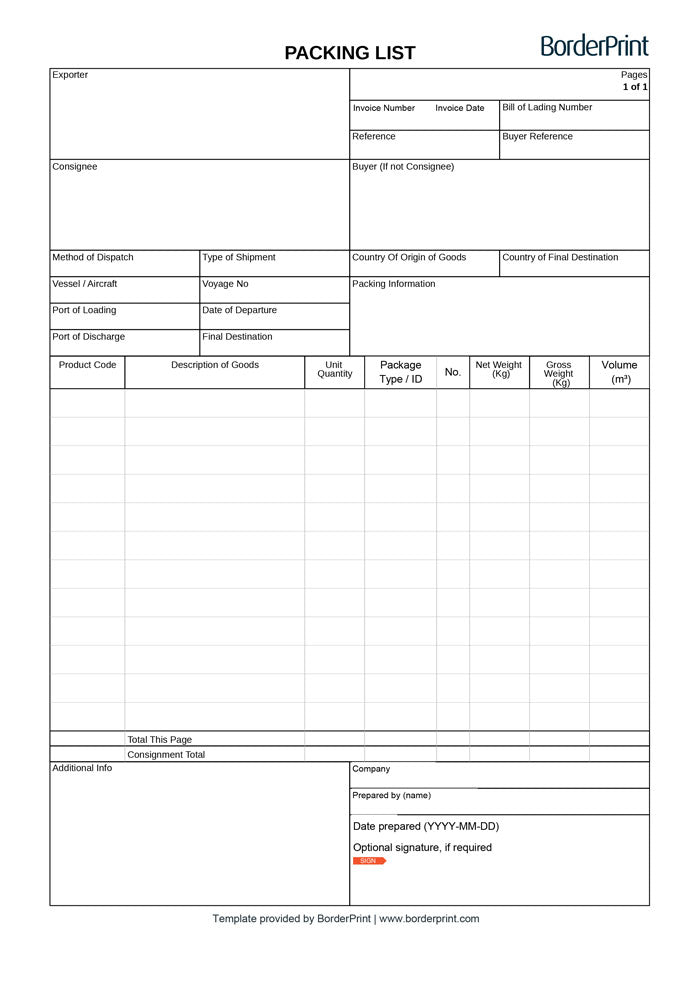


Organize your shipment details with BorderPrint’s fillable packing list. This reusable, one-page PDF includes 12 item rows, automatic totals, and clearly arranged fields for goods, packages, weights, and shipment references.
Features
- Digitally fillable fields: Enter exporter, consignee, buyer, transportation, and shipment information directly into the PDF.
- 12 item rows: Record product codes, goods descriptions, quantities, package types, and package identifiers.
- Automatic totals: Adds quantities, package counts, net weights, gross weights, and volumes entered in the item rows.
- Easy-to-follow fields: Blue fields accept your entries, while grey total fields calculate automatically.
- Optional digital signature: Includes preparer details and a digital signature field for shipments that require signing.
- Reusable template: Keep a blank master copy and save a separate completed packing list for each shipment.
Important: Download Before Completing
Download the PDF and open it in the desktop Adobe Acrobat Reader app. Built-in browser PDF viewers may not support all automatic calculations or certificate-based signing features (PDF compatibility guidance).
How to Complete Your Packing List
- Download and open: Save the PDF to your computer and open it in desktop Adobe Acrobat Reader. Keep an unused copy as your master template.
- Enter shipment details: Complete the exporter, consignee, buyer, invoice, bill-of-lading, and transportation fields as applicable.
- Add your goods: Enter each product’s code, description, and quantity. Identify the unit of measure in the description.
- Identify your packages: Enter the package type or ID, such as “Carton C01,” and the numeric package count in the “No.” field. Use the Packing Information area for shipping marks and dimensions.
- Enter weights and volume: Enter each row’s total net weight and gross weight in kilograms, and total volume in cubic metres. These are row totals, not per-unit figures; the form adds them without multiplying by quantity.
- Review the totals: Move out of the completed field and check the calculated quantities, package counts, weights, and volume. “Total This Page” and “Consignment Total” match because this template contains one page.
- Complete and save: Enter the company, preparer’s name, and date prepared. Sign only if required, then save a completed copy under a new name.
Avoid Double-Counting
If several products share one carton or pallet, count that package only once. Do not repeat its full weight or volume on every product row; record or allocate those amounts once and identify the shared package clearly.
Use consistent units of measure when relying on the combined quantity total. Do not treat a total that mixes pieces, metres, or other different units as one meaningful shipment quantity.
Optional Signature
Leave the signature field blank unless signing is required for your shipment. If a signature is requested, confirm the accepted method with your customs broker, carrier, or receiving party before signing.
The included certificate-based signature field uses a digital ID in Adobe Acrobat. Complete all entries before selecting or configuring your digital ID and signing (Adobe signing instructions).
Before Submitting
A packing list supports shipment identification and cargo checking; it does not replace a commercial invoice. Its shipment information should be consistent with the commercial invoice (export documentation guidance).
Review all entries and confirm any shipment-specific documentation requirements with your customs broker or carrier before use. This template does not guarantee customs acceptance.
How You Receive It
Free instant download: select Download fillable PDF at the top of this page. No checkout, account or email is required.
Save your downloaded master copy for future shipments. This is a digital PDF product; no physical item will be shipped.