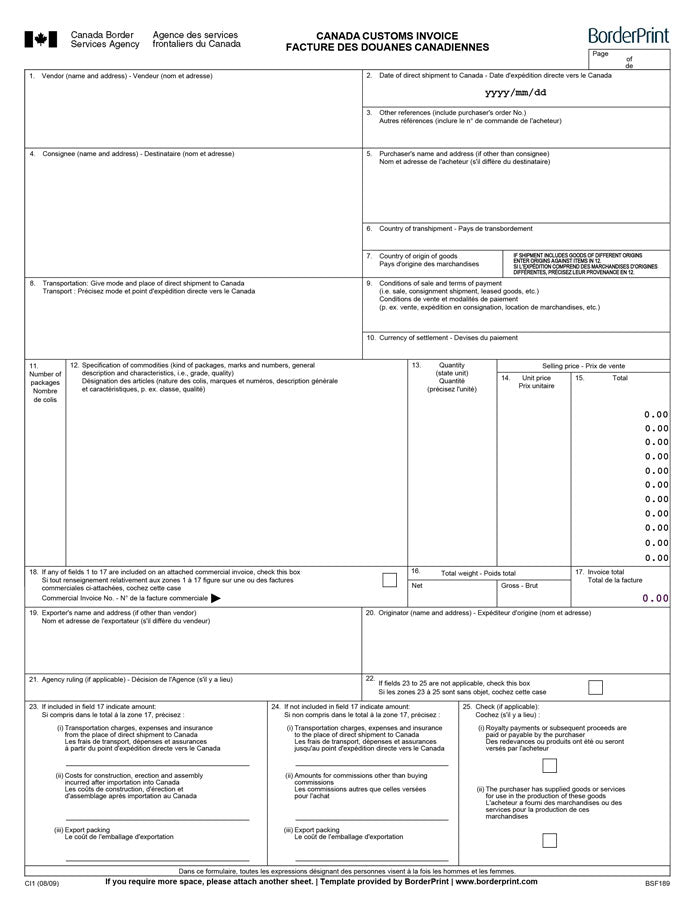


Prepare your Canadian import paperwork with BorderPrint’s fillable Canada Customs Invoice. This reusable PDF helps you organize shipment details and calculate item values without manually adding every line or paying ongoing subscription fees.
Features
- Automatic calculations: Built-in formulas multiply quantities by unit prices and calculate your invoice total, helping reduce manual calculation errors.
- Digitally fillable fields: Enter your vendor, consignee, purchaser, shipment, and goods information directly into the PDF.
- Canada Customs Invoice format: Organize your shipment information using the CI1 fields, including descriptions, quantities, prices, currency, and weights.
- Reusable template: Save a blank master copy locally and create a separate completed copy for each shipment.
Important: Download Before Completing
Download the PDF and open it in the desktop Adobe Acrobat Reader app for the recommended completion workflow. Browser PDF viewers may not support all JavaScript-driven form features, including automatic calculations (PDF compatibility guidance).
How to Complete Your CCI
- Download and save: Save the PDF to your computer and keep an unused copy as your master template.
- Open in Adobe Acrobat Reader: Launch the desktop app and open your saved PDF.
- Enter shipment information: Complete the applicable vendor, consignee, purchaser, shipment date, transportation, and payment fields.
- Add your goods: Enter clear descriptions, package counts, quantities, units of measure, and unit prices.
- Check the calculated values: Move out of each completed field, then review the line-item totals and invoice total.
- Complete weights and remaining fields: Enter the shipment’s net and gross weights and review any applicable valuation information.
- Save your completed invoice: Use a new name for each shipment so your blank master remains available for reuse.
For field-by-field guidance, refer to the CBSA’s official completion instructions. Confirm shipment-specific requirements with your customs broker or carrier before submitting your documents.
How You Receive It
Free instant download: select Download fillable PDF at the top of this page. No checkout, account or email is required.
Save your downloaded master copy for future shipments. This is a digital PDF product; no physical item will be shipped.