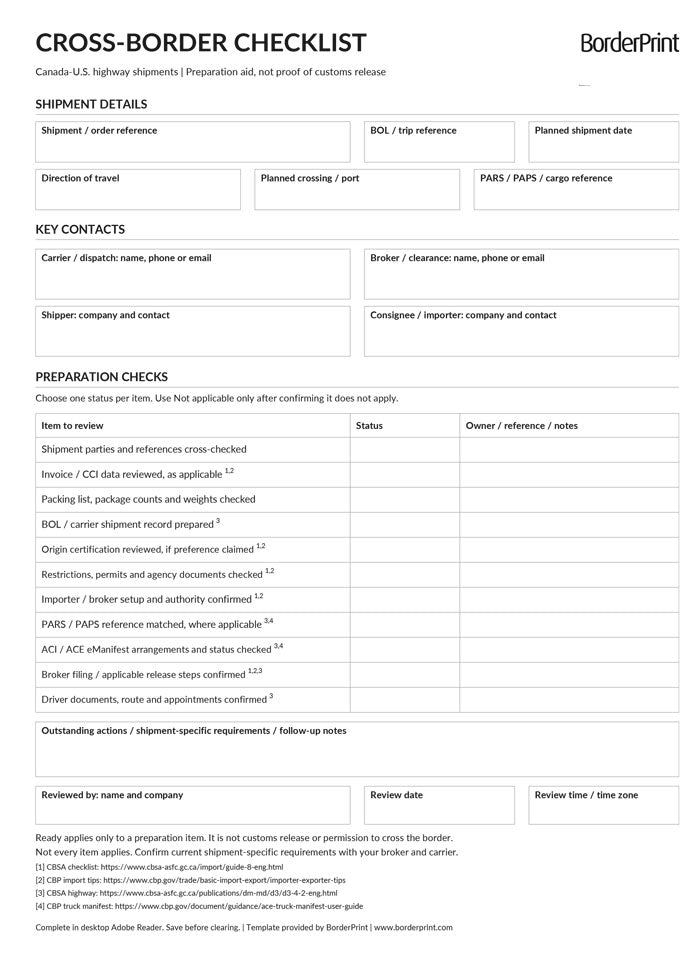


Keep your Canada–U.S. shipment preparations organized with BorderPrint’s free, fillable Cross-Border Shipment Checklist. This reusable, one-page PDF brings shipment references, key contacts, document checks, and outstanding tasks together in one place.
Features
- Digitally fillable fields: Enter shipment details, direction of travel, planned crossing, and BOL, PARS, or PAPS references.
- 11 preparation checks: Review invoices, packing lists, BOLs, origin certification, permits, broker arrangements, eManifest status, and driver preparations.
- Simple status dropdowns: Mark each item as Ready, Pending, or Not applicable.
- Contacts and follow-up notes: Record carrier, broker, shipper, and consignee contacts, plus the owner, reference, or next action for each check.
- Reusable master: Save a separate completed checklist for each shipment. No ongoing subscription is required.
- Clear Form button: Reset shipment details, statuses, and notes after confirmation. The button does not appear when printed.
How to Complete Your Checklist
- Download and open: Save the PDF to your computer, keep an unused master copy, and open it in desktop Adobe Acrobat Reader.
- Enter shipment details: Add your shipment and BOL references, planned shipment date, direction of travel, border crossing, and applicable cargo reference.
- Add key contacts: Enter contact information for the carrier or dispatch team, customs broker, shipper, and consignee or importer.
- Review each preparation item: Select Ready, Pending, or Not applicable. Use Not applicable only after confirming that the item does not apply to your shipment.
- Record outstanding actions: Use the notes fields to identify missing information, responsible parties, and follow-up tasks.
- Review and save: Enter the reviewer’s details, review date, and time zone. Use Save As with a new filename to preserve your blank master, then print or share the completed checklist as needed.
Important Information
This checklist is a preparation aid, not a customs declaration, release notice, or authorization to cross the border. Selecting Ready confirms only that you have reviewed that preparation item; it does not confirm customs release.
Confirm current shipment-specific requirements and release status with your customs broker and carrier. The checklist does not replace invoices, customs filings, permits, or other required shipment documents.
This is a digital PDF download. No physical product will be shipped.