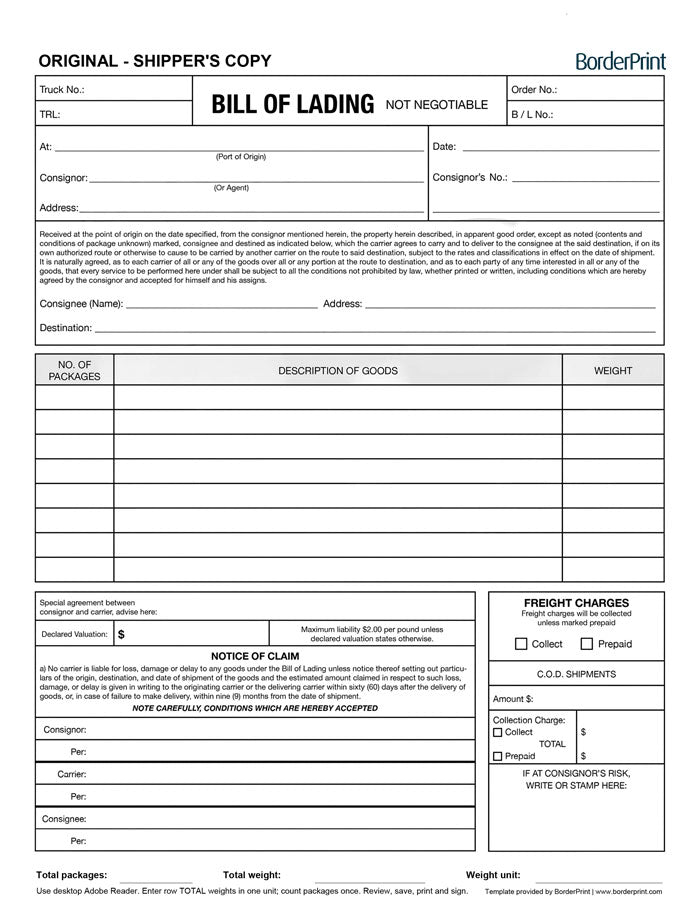


Prepare your shipping paperwork with BorderPrint’s free, digitally fillable Bill of Lading. Enter shipment details once to populate the shipper, carrier, and consignee copies, then save your completed PDF and print when needed.
This reusable template includes automatic package and weight totals, an editable BOL number, and a Clear Form button for starting your next shipment. It uses a standard BorderPrint layout; customer-specific logos and company branding are not included.
Features
- Three linked copies: Shared shipment information automatically appears on the shipper, carrier, and consignee copies.
- Digitally fillable fields: Enter company details, addresses, shipment references, freight descriptions, quantities, weights, and applicable charges.
- Eight freight rows: Space for package counts, goods descriptions, and row weights.
- Automatic totals: Calculates total packages and total weight without counting the three copies as separate shipments.
- Manual BOL numbering: Enter your own shipment number using your existing numbering system.
- Weight unit selector: Choose kilograms or pounds and use that unit throughout the form.
- Clear Form button: Reset entries across all three copies after confirming. The button is visible on screen but does not print.
- Reusable PDF: Keep a blank master and save a separate completed copy for each shipment.
Important: Download Before Completing
Download the PDF and open it in the desktop Adobe Acrobat Reader app. Use this workflow for completing the linked fields, automatic calculations, and Clear Form action.
The signature lines are intended for handwritten signatures after printing. No digital signature certificate is required for this workflow.
How to Complete Your BOL
- Download and save: Save the PDF to your computer and keep an unused copy as your master template.
- Open in Adobe Acrobat Reader: Open your saved file in the desktop app.
- Enter your BOL number: Assign a unique shipment number. Numbers do not automatically generate or increase.
- Complete shipment details: Enter the applicable consignor, consignee, carrier, address, date, and reference information.
- Add your freight: Enter package counts, descriptions, and the total weight for each row. Select kg or lb below the form.
- Complete applicable charges: Enter declared value and C.O.D. details where required, and select the appropriate Collect or Prepaid options.
- Review all three copies: Check your entries, payment selections, and calculated totals before use.
- Save, print, and sign: Save under a new filename, print the required copies on 8.5 × 11-inch letter-size paper, and obtain the applicable signatures.
Before You Use the Form
Enter each row’s total weight, not its per-package weight. Count each package only once, and use one weight unit throughout; selecting kg or lb does not convert entered values.
C.O.D. amounts and the C.O.D. total are entered manually. Save a completed shipment copy before using Clear Form, as it clears entries on all three pages.
Confirm that the form meets your carrier’s and shipment’s requirements. A Bill of Lading does not replace required customs invoices, permits, or other shipment-specific documents.
Need Your Company Branding?
For a reusable fillable BOL personalized with your company logo and business details, choose our Custom-Branded Bill of Lading – Reusable Fillable PDF.
This is a free digital PDF product. No physical forms, carbonless copies, or NCR booklets will be shipped.