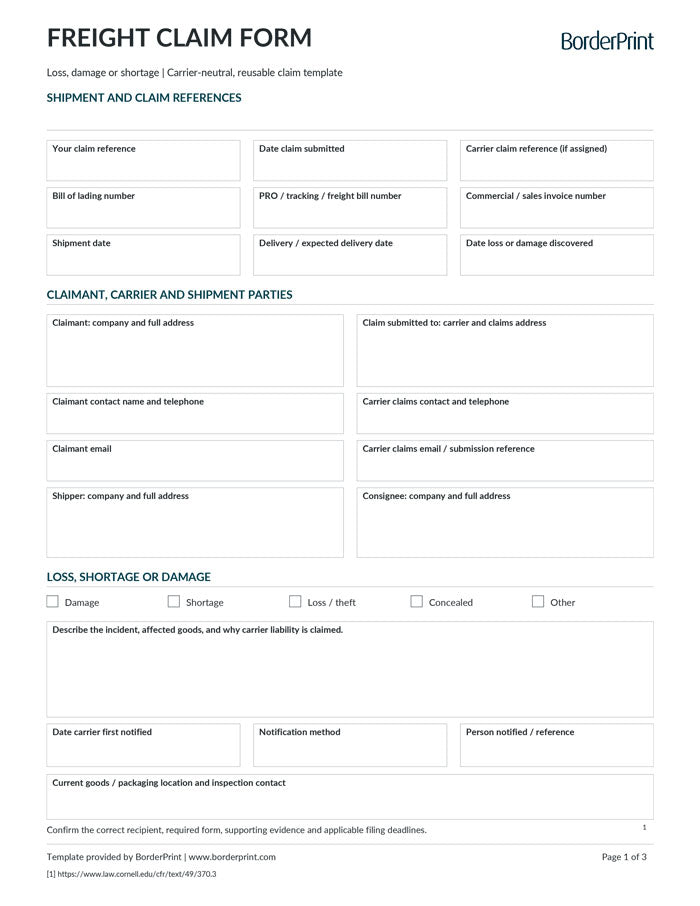


Organize your freight loss, damage, or shortage claim with BorderPrint’s free, digitally fillable Freight Claim Form. This reusable three-page PDF includes shipment details, an itemized claim calculator, a supporting-document checklist, and signature and submission instructions.
Features
- Digitally fillable fields: Enter claimant, carrier, shipper, consignee, and shipment information directly into the PDF.
- Claim details: Record damage, shortages, loss or theft, concealed damage, and other incidents, along with notification and inspection information.
- Six itemized claim rows: Describe affected goods and enter the quantity and amount claimed per unit.
- Automatic calculations: Calculates each line amount and goods subtotal, adds other claimed amounts, and subtracts deductions.
- Linked information: Your claim reference carries across all three pages. The total amount claimed and currency carry onto the signature page.
- Supporting-document checklist: Track attached shipment records, delivery receipts, invoices, freight bills, photos, inspection reports, and repair documents.
- Clear Form buttons: Reset entries across all three pages after confirmation. The buttons do not appear on printed copies.
- Clean printing: Transparent entry fields have no permanent blue or grey backgrounds.
- Reusable master: Keep a blank copy and save a separate completed PDF for each claim.
Important: Confirm Your Carrier’s Requirements
This is a general-purpose template, not a carrier’s official claim form or a guarantee of payment. Before submitting, confirm the correct recipient, accepted submission method, required supporting documents, signing requirements, and applicable notice and filing deadlines.
Download Before Completing
Download the PDF and open it in desktop Adobe Acrobat Reader. Use this recommended workflow to complete the form, review its calculations, and save your claim. Keep an unused master copy for future use.
How to Complete Your Freight Claim
- Save and open: Download the PDF to your computer and open it in desktop Adobe Acrobat Reader.
- Identify the shipment: Enter your claim reference, submission date, BOL number, PRO or tracking number, invoice number, and applicable shipment, delivery, and discovery dates.
- Complete the party details: Enter the claimant, carrier claims contact, shipper, and consignee information.
- Describe the incident: Select the applicable claim types and explain what happened, which goods were affected, and why you are claiming carrier liability.
- Record notification details: Enter when and how the carrier was notified, the contact or reference number, and the current location of the goods and packaging.
- Itemize the claim: On page two, enter the currency code and complete the quantity, description, and amount claimed per unit for each affected item. Each line amount calculates automatically.
- Explain the amounts: Describe the valuation or repair basis. Enter any additional claimed amounts and deductions, such as salvage, credits, or prior payments, with supporting explanations.
- Review the total: Move out of each completed field, then check the goods subtotal and total amount claimed. Enter additions and deductions as positive amounts; the form subtracts deductions automatically.
- Prepare supporting documents: Check the applicable attachment boxes and gather the documents required by your carrier. Checking a box does not attach a file to the PDF.
- Save and sign: Complete the representative details and save a separate copy. Page three includes a handwritten signature line and a fillable signature-date field; print and sign as required by your carrier.
- Submit and retain a copy: Send the completed claim and supporting documents through the carrier’s accepted channel. Keep a copy and evidence of submission for your records.
Before Submitting
- Use one currency: Enter the currency code and use it consistently for all claimed amounts and deductions.
- Complete both numeric fields: Each item needs a quantity and an amount claimed per unit for its line total to calculate.
- Avoid duplicate amounts: Do not include the same loss or expense in both the itemized rows and additional claimed amounts.
- Check deductions: Confirm deductions are accurate and do not exceed the claimed amounts.
- Save before clearing: Clear Form removes entered information from all three pages after confirmation.
- Submit separately: Completing or saving this PDF does not send a claim to the carrier.
How You Receive It
Free instant download: select Download fillable PDF at the top of this page. No checkout, account or email is required.
Save your downloaded master for future claims. This is a digital PDF product; no physical forms are shipped, and custom company branding is not included.